KDP Birthday Guest Book Interior: Creating Memorable Keepsakes with Professional Templates
Celebrating a birthday is about more than just cake and candles; it is about capturing the presence of friends and family who make the milestone meaningful. For self-publishers, event planners, and individuals looking to create a personalized memento, a KDP Birthday Guest Book Interior serves as the foundational blueprint for a high-quality keepsake. Rather than settling for generic, mass-produced notebooks available at retail stores, utilizing a professional interior template allows you to publish a book that feels bespoke, intentional, and perfectly sized for the occasion. This resource is specifically designed to bridge the gap between digital design and physical memory-keeping, providing the structural elements necessary to produce a polished guest book through Amazon’s print-on-demand platform.
Understanding the KDP Birthday Guest Book Interior
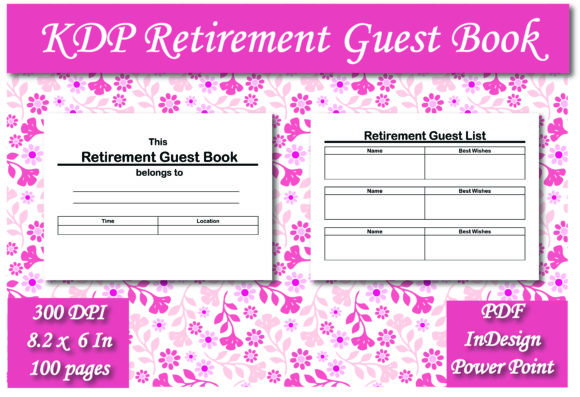
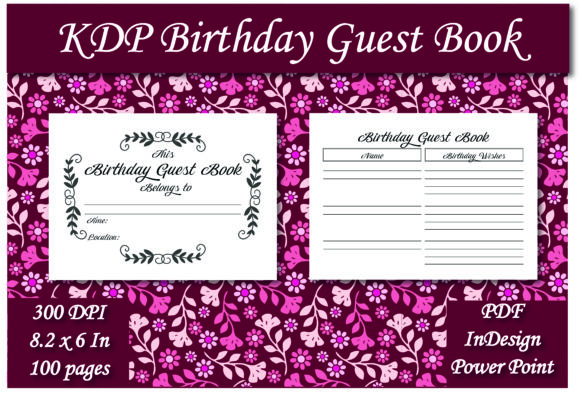
A KDP Birthday Guest Book Interior is a pre-formatted digital file package created specifically to meet the technical specifications of Amazon Kindle Direct Publishing while catering to the aesthetic needs of birthday celebrations. Unlike a standard manuscript filled with prose, this interior focuses on functional layout design. It typically consists of 100 pages featuring a lined guest list format, optimized for handwriting legibility and visual balance. The dimensions are set to 8.2 x 6 inches, a versatile size that offers ample writing space without being cumbersome to display on a gift table or pass around during a party.
The true value of this interior lies in its multi-format accessibility. When you acquire this resource, you receive three distinct file types: PDF, Adobe InDesign, and PowerPoint. This trio ensures that users with varying levels of design expertise can successfully customize and publish their guest book. The PDF is ready for immediate upload for those who want a quick solution, while the InDesign and PowerPoint files provide editable layers for those wishing to add specific names, dates, themes, or decorative elements before publishing.
Solving Common Self-Publishing Challenges
Creating a low-content book like a guest book often presents unexpected hurdles for new publishers. One of the most frequent issues is incorrect margin settings. If margins are too narrow, text gets swallowed by the binding gutter; if they are too wide, the page looks unprofessional. A dedicated KDP Birthday Guest Book Interior eliminates this guesswork. The 8.2 x 6 inch trim size has been calculated with appropriate bleed and safety zones, ensuring that every line and header prints exactly where intended.
Another significant challenge is software compatibility. Not everyone owns expensive graphic design software. By including a PowerPoint version alongside industry-standard InDesign files, this template democratizes the design process. Users who are comfortable with office presentation software can easily modify text boxes, change fonts, or insert photos without needing to learn complex vector tools. Conversely, professional designers can utilize the InDesign source file for granular control over typography and spacing. This flexibility addresses the diverse technical capabilities of the target audience, ensuring that lack of software never prevents the creation of a beautiful product.
Practical Applications and Customization Strategies
The versatility of a KDP Birthday Guest Book Interior extends beyond simple name collection. With 100 pages of lined content, this template supports various interactive approaches to memory keeping. Here are practical ways different users can leverage this interior:
- The Classic Registry: Use the lined sections strictly for "Name," "Message," and "Contact Info." This traditional approach works best for large gatherings where efficiency is key.
- The Advice Column: Customize the headers in the PowerPoint or InDesign file to prompt guests for "Birthday Wishes" or "Advice for the Year Ahead." The generous line spacing accommodates longer, more thoughtful responses.
- The Photo Integration: Utilize the editable source files to insert a photo of the birthday person on the first page or as a watermark background. This transforms a generic notebook into a themed commemorative volume.
- Series Creation: Publishers can use the master files to create a series of age-specific books (e.g., Sweet 16, 30th, 50th) by simply changing the cover art and title page while retaining the proven interior layout.
For those creating these books as gifts rather than for commercial sale, the ability to edit the interior means you can add a personal dedication page before the guest list begins. This small addition significantly increases the sentimental value of the final printed book.
Optimizing the 8.2 x 6 Inch Format
The choice of an 8.2 x 6 inch trim size for a KDP Birthday Guest Book Interior is strategic. Standard trade sizes like 6x9 can sometimes feel too tall for a guest book, leading to excessive white space or requiring guests to write uncomfortably long messages to fill the line. The slightly wider, shorter aspect ratio of 8.2 x 6 creates a landscape-leaning feel that mimics traditional photo albums and scrapbooks. This orientation encourages concise, meaningful entries and makes the book easier to handle in crowded party environments.
Furthermore, this size maximizes cost-efficiency on KDP. It fits within standard printing tiers, keeping production costs low while maintaining a premium perception. For sellers, this margin flexibility allows for competitive pricing. For personal users, it ensures that printing a single proof copy remains affordable. When designing your customizations, remember to maintain this aspect ratio's balance; avoid placing heavy graphical elements near the outer edges to preserve the clean, writable area that defines a functional guest book.
Implementation Tips for Best Results
To get the most out of your KDP Birthday Guest Book Interior, consider the following implementation recommendations based on user experience and platform best practices:
- Always Order a Proof: Even with professionally formatted files, screen colors and resolutions differ from print output. Order a paperback proof to verify that the line weight is visible but not distracting, and that the paper quality suits your intended use case.
- Check Font Licensing: If you modify the InDesign or PowerPoint files using new fonts, ensure you have the appropriate commercial license if you plan to sell the book. The original template fonts are cleared, but substitutions require verification.
- Maintain Consistent Margins: When adding custom headers or graphics, use the guide layers included in the source files. Do not delete these guides until you are ready to export, as they prevent accidental misalignment.
- Test Writeability: Before finalizing, print a single page at actual size and test it with various pens. Ensure the line spacing allows for average handwriting sizes without cramping.
- Leverage the Lined Structure: Avoid removing the lines unless you have a specific artistic reason. Lines provide necessary structure for guests and prevent messy, slanted writing that detracts from the keepsake quality.
Meeting Diverse User Needs
Different creators approach the KDP Birthday Guest Book Interior with distinct goals. Commercial publishers prioritize scalability and niche targeting. For them, the inclusion of editable source files is crucial for rapid iteration across multiple birthday themes without rebuilding layouts from scratch. They focus on keyword optimization and cover design, relying on the interior to be a reliable, evergreen asset.
Conversely, individual users creating a one-off book for a loved one prioritize emotional resonance over efficiency. They benefit most from the PowerPoint option, which lowers the barrier to entry. Their focus is on personalization—adding inside jokes, family photos, or specific prompts that reflect the personality of the celebrant. Understanding which category you fall into helps determine how much time to invest in customization versus utilizing the ready-to-upload PDF.
Ultimately, this interior template serves as a practical solution to a common problem: the desire for a tangible record of celebration in an increasingly digital world. By providing professional formatting in accessible file types, it empowers users to create physical artifacts that honor relationships and milestones. Whether you are building a publishing portfolio or preserving memories for a golden birthday, the right interior foundation ensures the final product is as enduring as the memories it holds.